How to photograph amigurumi for Etsy and Pinterest
Beautiful photos sell your handmade plushies — learn how to capture your crochet creations in natural light with simple, affordable props so every listing stops the scroll.

You spent hours crocheting the perfect little fox, stuffed it to perfection, and added the cutest safety eyes — but when you photograph it with your phone, something feels flat. The colors look dull, the details disappear, and clicks never come. Great amigurumi photography does not require an expensive camera. It requires understanding light, background, and how to show your plushie's personality.
Why photos matter more than anything else on Etsy and Pinterest
Your photograph IS your product listing on both platforms — shoppers cannot touch or hold the plushie, so the image must do all the selling.
On Etsy, the first thumbnail is the only thing a buyer sees before deciding whether to click. On Pinterest, your image competes with thousands of other pins in a fast-scrolling feed. A sharp, well-lit, inviting photo can double your click-through rate compared to a dim or cluttered one. If you are just getting started with selling, our guide to how to sell crochet patterns on Etsy covers the listing strategy side, but photos are always the first priority.
The single most important thing: natural window light
The biggest upgrade you can make costs nothing. Natural, indirect daylight from a large window produces soft, even light that flatters yarn textures and brings out color accurately. Direct sun creates harsh shadows and blows out light-colored yarns — move back a step so the sunlight is indirect, or place a white sheet of paper on the opposite side of your subject to bounce light back into the shadows.
North-facing windows are ideal because they never receive direct sun. East-facing windows work beautifully in the morning. Avoid photographing under artificial ceiling lights alone — they cast a yellow tint that makes whites look dingy and can make vibrant colors look muddy.
Choosing the right background
A plain white or light cream background is the safest choice for Etsy listings because it keeps the focus entirely on your amigurumi and looks professional in thumbnail view. You can use a sheet of white poster board (roughly $1 at a dollar store), a white foam board, or a piece of light-colored fabric with a soft drape. For Pinterest pins, slightly more textured backgrounds — a linen napkin, a wooden tray, a woven placemat — add warmth and lifestyle appeal without competing with the plushie.
Avoid busy, patterned backgrounds that make it hard to see where the amigurumi ends and the background begins. If you are photographing a small amigurumi like those in our 10 easy amigurumi patterns for beginners, a simple saucer or small ceramic dish can give it a little height and context.
Camera settings and gear for beginners
A recent smartphone camera is more than capable of producing excellent product photos. The key is to tap on your subject on the screen to set focus and exposure, then hold very still or prop your phone against a stack of books. Blurry photos are the number-one reason shoppers do not trust a listing. If you can afford one add-on, a small flexible tripod (gorillapod style) for your phone makes a significant difference — they cost around $15-25 and eliminate blur entirely.
Portrait mode can look lovely, but be careful: the artificial background blur sometimes clips the edges of textured yarn and looks unnatural. A plain sharp photo often outperforms a heavily processed one. Turn off any digital filters and let the natural light do the work.
"Your amigurumi deserves photos that show how much love went into every stitch — great light and a clean background are all it takes to make buyers fall in love before they even read the description."— Ava, MrsCrochetWorld
Three amigurumi styles worth photographing beautifully
These popular patterns give you the perfect subjects to practice your new photography skills — each one has a distinct personality that shines in a well-lit shot.

Care Bears amigurumi bundle
Character inspiredThese pastel bears photograph beautifully against white — their soft colors pop without competing backgrounds. Line them up in a row for a group shot or photograph each bear individually with a tiny heart prop. If you want to learn more about what amigurumi is before you start, our complete guide has everything you need.

Dinosaur crochet bundle
Bundle valueGreen dinosaurs look striking on a simple white background with a few loose leaves for context — a small eucalyptus sprig or a couple of fern fronds from the garden add a natural feel that fits the dino theme perfectly. A fun, themed prop like a tiny paper volcano can delight buyers on Pinterest. Check our tips on how to stuff amigurumi so your dinos are perfectly plump before the photo shoot.

50 no-sew amigurumi bundle
Mega bundleWith 50 characters to choose from, you have endless styling options — pick three or four that complement each other in color and size for a group hero shot. Variety in a single frame signals value to buyers browsing our mega bundles. If you are new to the no-sew approach, read about no-sew amigurumi techniques first so every seam is invisible in the photo.
Six photography setups that work for any budget
You do not need a studio — these simple setups use things you likely already own.
Window light setup
Place a white foam board at a 45-degree angle to a north-facing window. Rest your amigurumi between board and window. Tap the plushie face on your phone screen to nail the focus and exposure.
Sweep background
Curve a large piece of white poster board so it sweeps from vertical to horizontal with no visible corner. This creates a seamless backdrop that looks clean in every angle — a favorite trick of product photographers.
Lifestyle prop styling
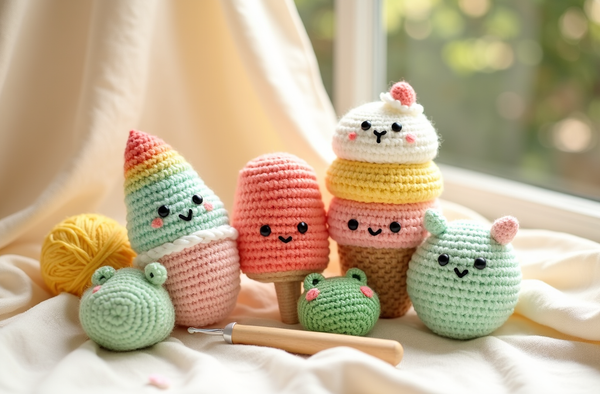
Add one or two complementary props — a small book, a tiny cup, seasonal leaves — to create a scene. Keep props smaller than the amigurumi so the plushie always remains the hero of the shot.
The flat lay angle
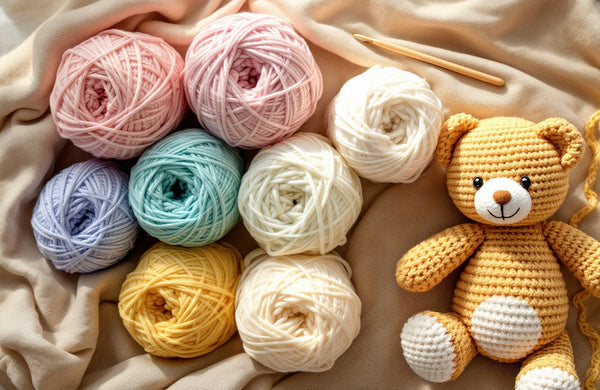
Shooting straight down from above (flat lay) works brilliantly for small amigurumi and patterns. Arrange several pieces together, add some yarn or a hook as a prop, and shoot from directly overhead for a popular Pinterest style.
Close-up detail shots
Etsy recommends multiple listing images. Include at least one close-up that shows yarn texture, safety eyes, and stitching detail. Tap directly on the eye or nose in your phone app to lock focus on the most important feature.
Scale reference shot
Add a coin, a hand, or a ruler in at least one photo so buyers can immediately understand the finished size. This reduces returns and boosts buyer confidence — learn more in our complete beginner guide to crochet.
Quick tips for scroll-stopping Etsy and Pinterest photos
- Edit lightly in your phone app: Nudge brightness up slightly and boost contrast a touch. Avoid heavy filters — they shift yarn colors away from what buyers will receive and lead to disappointment.
- Photograph at face height: Position the camera at the same level as the amigurumi's face for the most engaging, character-forward shot. Shooting from above flattens the personality; shooting from below can make small details look distorted.
- Shoot in batches on cloudy days: An overcast sky acts as a giant natural softbox, giving beautifully even, shadow-free light. Block out two hours on the next overcast afternoon and photograph your whole inventory in one session.
- Use your phone's grid lines: Turn on the rule-of-thirds grid in your camera settings and place your amigurumi at one of the intersection points rather than dead center — this creates a more dynamic, professional composition.
- Check your safety eyes in photos: Safety eyes can appear very dark in photos. Try placing a tiny white highlight dot with a correction pen or toothpick dipped in white paint before shooting — it adds life to the eyes. Our guide on how to add safety eyes to amigurumi covers placement for best photographic results.
- Pinterest vertical format: Pinterest favors tall images (2:3 ratio, ideally 1000×1500 px). Shoot your Etsy squares first, then reshoot or crop vertically for Pinterest with text overlay added in a free app like Canva.
Ready to show off your next amigurumi?
Grab one of our free patterns, crochet something adorable, then put your new photography skills to work. Your Etsy shop and Pinterest boards are about to level up.
Get a free pattern Shop amigurumi patternsFrequently asked questions
What is the best light for photographing amigurumi?
Natural indirect daylight from a large window is the best light for amigurumi photography. A north-facing window works all day because it never gets direct sun. If your window faces east or west, photograph in the morning or late afternoon respectively and use a white card to bounce light back into the shadows. Avoid mixing window light with overhead artificial lights, as the color temperatures clash and create an uneven, unflattering result.
Do I need a professional camera to sell amigurumi on Etsy?
No — a recent smartphone camera is fully capable of producing high-quality product photos for Etsy and Pinterest. The biggest factors in photo quality are good natural light and a clean background, not the camera itself. Use a small tripod or prop your phone against a stable surface to eliminate blur, tap your subject to set focus and exposure, and edit lightly in your phone's built-in photo app.
What background is best for amigurumi Etsy listings?
A plain white or light cream background is the most effective for Etsy product listings because it keeps buyer attention entirely on the amigurumi and looks crisp in thumbnail view. White foam board or poster board costs about $1 and creates a professional seamless sweep background. For Pinterest lifestyle pins, slightly textured natural surfaces like linen, light wood, or a woven mat add warmth while still keeping the focus on your plushie.
How many photos should I include in an Etsy amigurumi listing?
Etsy allows up to ten listing photos and using all ten is highly recommended. Include at least one clean hero shot on a white background, one close-up showing yarn texture and facial details, one shot showing the finished size (with a hand or coin for scale), one lifestyle or styled shot, and one showing all colorway options if applicable. More photos reduce buyer uncertainty and generally lead to higher conversion rates.
What image size should I use for Pinterest amigurumi pins?
Pinterest strongly favors vertical images at a 2:3 aspect ratio. The recommended dimensions are 1000 x 1500 pixels at 72 dpi or higher. Shoot your product photos in square format first for Etsy, then re-shoot or crop and extend the canvas vertically for Pinterest. Adding a short text overlay with the pattern name using a free design tool like Canva helps the pin perform well in search feeds.
Should I use portrait mode or bokeh blur when photographing amigurumi?
Portrait mode or artificial background blur can look attractive but should be used cautiously for amigurumi. The edge-detection algorithms in phone cameras sometimes blur parts of the yarn texture or the outer edges of the plushie, making the object look cut out unnaturally. A sharp, well-lit photo on a clean plain background usually outperforms a heavily blurred one for product listings. If you do use portrait mode, inspect the edges carefully before uploading.
How do I make amigurumi eyes look lively in photos?
Safety eyes can appear very dark or flat in photographs. Before your photo session, use a toothpick dipped in a tiny drop of white acrylic paint or a white correction pen to add a small highlight dot in the upper corner of each eye. This mimics the catchlight you see in portrait photography and gives your amigurumi an expressive, alive look. Position the highlight dot in the same position on both eyes for a consistent look.
How do I style props for amigurumi photos without distracting from the plushie?
The golden rule for prop styling is that props should be smaller than the amigurumi and complement its theme or color palette rather than compete with it. For animal characters, natural props like a small dried flower, a leaf, or a tiny wooden spool of thread work beautifully. Keep the number of props to one or two maximum. Remove anything that draws the eye away from the amigurumi face — the face is always the focal point of a great plushie photo.